
An investigative audit asks a pharmacy for a great deal at once: the prescriptions themselves, licenses, wholesaler invoices, who owns the pharmacy and who works there. The workspace in BatchRx turns that into a checklist you work through, and it keeps every document with the audit it belongs to.
The ten steps
Each step is saved with the audit, so you can stop and pick it up again later.
Upload the audit letter
Upload the audit letter the PBM sent you, as a PDF. BatchRx uses it to extract the Rx numbers the PBM is asking about and the details of the audit.
Prescriptions
For each Rx, add the front and the back of the prescription, the signature and the copay, plus any supporting document. A compound also takes its compound worksheet.
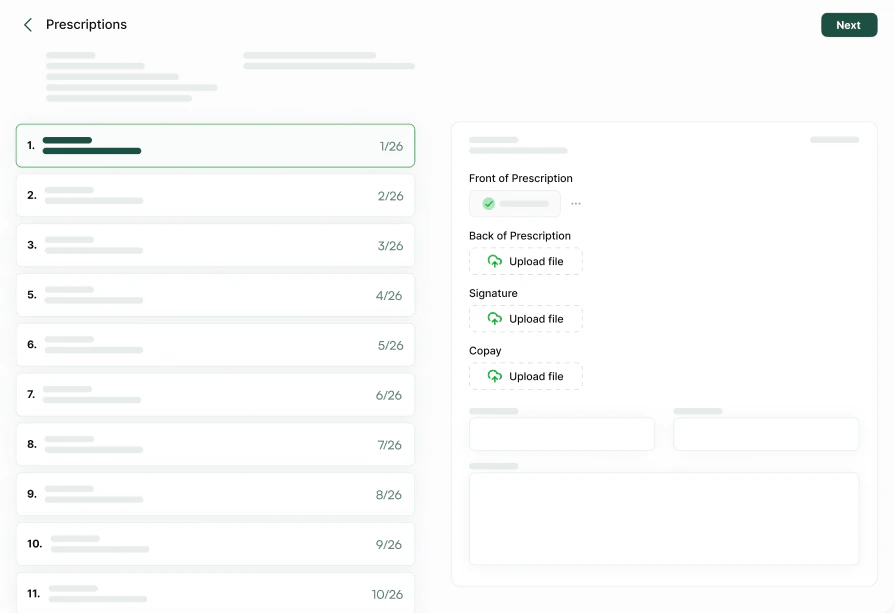
The Prescriptions step: every Rx on the left, its documents on the right. Pharmacy documents
Add your DEA license and your state license, and your tax exempt and resale certificates.
Wholesalers and invoices
List the wholesalers you purchased from and send each one an invoice request email from the app. BatchRx keeps the history of what was sent, including reminders.
Mailing information
Enter the percentages your pharmacy mails within your state and outside it.
Owners and employees
List the owners, pharmacists, technicians and other staff of the pharmacy.
Inter-pharmacy
An optional step, for the other pharmacies and service providers you do business with, and who to contact at each.
Reverse distributors
An optional step, for the reverse distributors you use and how to contact them.
Review and certification
Check what you have gathered, then certify it with your printed name, the pharmacy’s name and NCPDP number, and your signature.
Print and submit
Record the due date and the investigator’s email and fax, print the final summary and submit it with the required documents by the deadline. Marking the audit as submitted locks it against further changes.
What BatchRx does and what you do
BatchRx organises the response; it does not send it. You print the summary and submit the documents to the PBM yourself, by the route the audit letter gives.
Help with the audit
BatchRx provides one-on-one assistance with every audit. If you are answering an audit letter for the first time, request a demo and ask us to walk you through the workspace.
Reports to go with the response
The inventory report compares your purchases with your claims for every NDC and every payer, and the aberrant report shows your share of each PBM’s aberrant products.
Frequently asked questions
What is the investigative audit workspace?
A ten-step checklist inside BatchRx for answering a PBM audit letter: the audit letter, the prescriptions it asks about, pharmacy licenses, wholesaler invoices, mailing percentages, owners and employees, then a review, a certification and a summary to print.
Does BatchRx send the response to the PBM?
No. BatchRx organises the documents and prints the summary. The pharmacy submits the response to the PBM itself.
Which documents does each prescription need?
The front and the back of the prescription, the signature and the copay, plus any supporting document. A compound also takes its compound worksheet. Files can be PDFs or images.